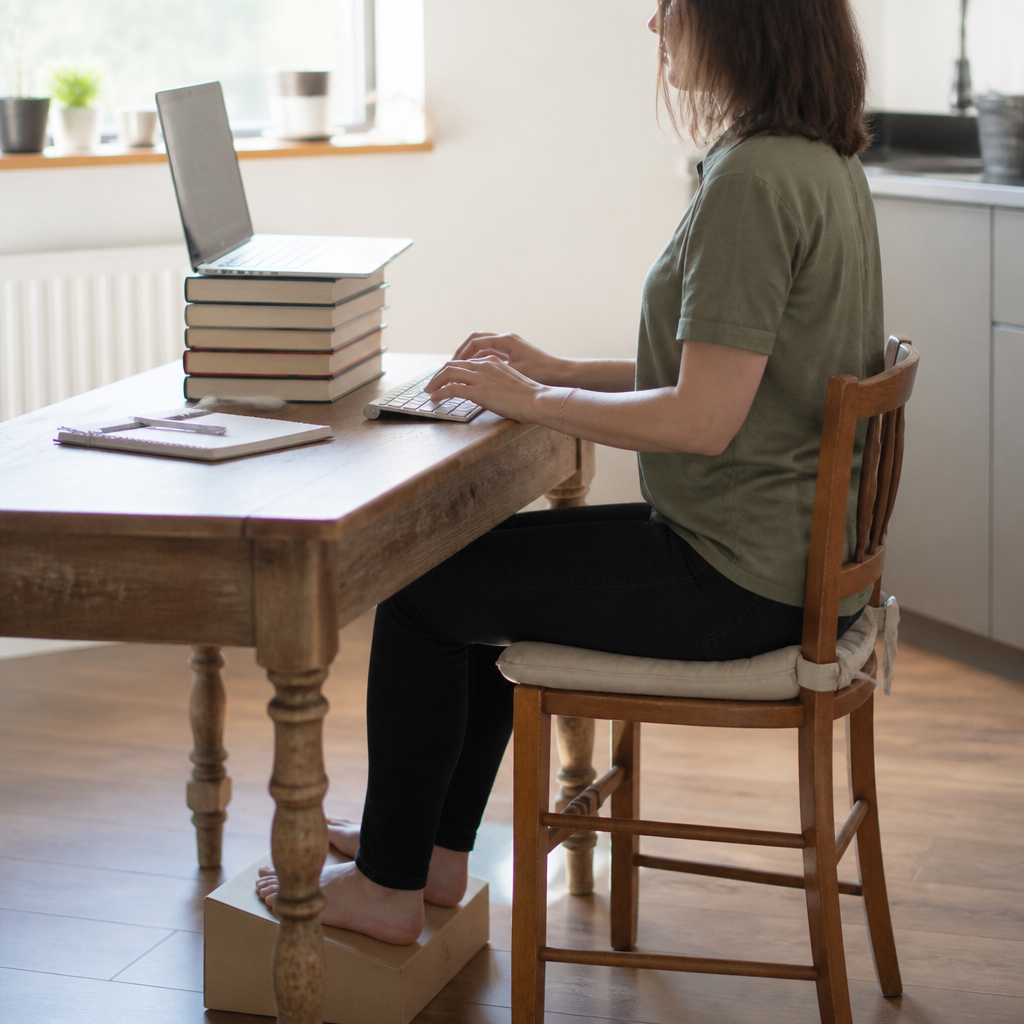
Home working was an emergency arrangement that became a permanent one. Office of National Statistics surveys have consistently put hybrid working at roughly a quarter to a third of working adults in Great Britain since the middle of the decade, which means a great many people now spend their working lives at furniture that was bought for eating dinner.
A different desk helps less than a different pattern, because sedentary time counts as its own variable separate from exercise. Researchers describe short bouts scattered through the day as movement snacks scattered through the day that keep leg muscles from idling for hours. A simple example is putting water out of reach on purpose so thirst becomes a scheduled reason to stand.
This guide is arranged in the order that produces results: the free changes first, the cheap purchases second, and the expensive chair a long way down. Nothing here requires a tape measure or an ergonomics qualification, and every step can be reversed if it does not suit.
The order to do this in
Most people start by shopping. That is understandable and almost exactly backwards, because the two things that cause the most trouble at a home desk both cost nothing to fix.
- Free, today
- Raise the screen, add a separate keyboard and mouse, pull the chair closer, get the feet flat, and set an alarm to stand up.
- Under twenty pounds
- A laptop stand or a stack of hardbacks, a wired keyboard and mouse, a folded towel for lumbar support, a box for the feet.
- Fifty to two hundred pounds
- A second monitor, a decent adjustable chair bought secondhand, a desk lamp that removes the glare from the screen.
- Later, if at all
- Sit stand desks, ergonomic mice, kneeling stools and everything sold with the word posture on the box.
The cheapest ergonomic upgrade in Britain is a stack of hardbacks and a separate keyboard. It costs nothing and it fixes the geometry that everything else is trying to compensate for.
The screen, which is where most of the trouble is
A laptop is two pieces of equipment welded into one compromise. The screen wants to be at eye level and the keyboard wants to be at elbow level, and they cannot both be right while they are attached to each other. Working directly on a laptop for eight hours means choosing between a bent neck and lifted shoulders, and most people quietly choose the neck.
Health and Safety Executive guidance for display screen equipment is unglamorous and reliable:
- The top line of text sits at roughly eye level, or a little below. Anyone wearing varifocals should go lower still, because otherwise the chin lifts all day to find the reading section of the lens.
- The screen sits about an arm's length away. If text is hard to read at that distance, increase the font size rather than moving the chair forward.
- The screen sits square in front of the body, not off to one side. A laptop pushed to the left of a monitor turns the neck for seven hours a day.
- No window directly behind the screen and none directly behind the head, since the first makes the eyes fight a bright background and the second puts a reflection across the display.
- With two screens of equal use, the join between them goes in front of the nose. With one main and one secondary, the main one goes centrally.
Raising a laptop is only half the job. Once the screen is at eye level the built in keyboard is far too high, so a separate keyboard and mouse are not an optional extra. They are the other half of the same fix, and a wired set costs less than a takeaway.
The chair you already own
Almost every adjustable chair in Britain is being used with its original factory settings, which were chosen for nobody in particular. Ten minutes with the levers is worth more than most upgrades.
The order is height, then depth, then back, then arms. Height first, because everything else is measured from it: raise or lower the seat until the forearms are roughly level with the desk surface when the shoulders are relaxed, then get the feet flat on the floor or on a box. Seat depth wants two or three fingers of space between the front edge of the seat and the back of the knee. The backrest wants to meet the natural hollow of the lower back rather than sitting above or below it. Armrests, if they exist, should just support the forearms without pushing the shoulders upward.
The full chair guide works through each of those steps with the compromises that come up when the chair has fewer levers than the diagram assumes, including what to do with a dining chair.
Desk height, and the kitchen table problem
Standard office desks are around 72 to 75 centimetres high. Dining tables are commonly the same or a little higher, which is why a kitchen table works better than its reputation suggests, and why a coffee table does not work at all.
The trouble with a dining chair is not the table, it is the seat: flat, fixed height, no lumbar shape and often slightly tipped back. Three fixes get most of the way there.
- Raise the sitter, not the table. A firm cushion brings the elbows up to the table surface. Once the feet no longer reach the floor, put a box, a ream of paper or a stack of books underneath them.
- Add a lumbar roll. A rolled hand towel at belt height, held in place by the chair back, does the same job as a moulded support for the price of a wash.
- Leave the front of the seat free. Sitting right back in a dining chair with a hard front edge presses under the thighs. A cushion that sits forward of the edge solves it.
The sofa deserves its own warning. Laptops on knees put the screen at its lowest and the wrists at their most bent, and the seat depth of a sofa forces the lower back into a long C shape. As an occasional arrangement it is harmless. As a Tuesday, it is the single most reliable way to arrive at Friday with a sore neck. If the sofa is genuinely the only option, sit at one end, put a cushion behind the lower back, put the laptop on a firm cushion on the lap to raise it, and cap it at forty minutes.
What is worth buying, and when
Very little, and later than the advertising suggests. In rough order of value for money:
- A separate keyboard and mouse, which unlock every other change. Wired ones are cheap and never need charging at the wrong moment.
- A laptop stand or riser. Books work identically. A stand is tidier and folds away, which matters when the desk is also where dinner happens.
- A footrest, or the box that the printer came in. Anyone under roughly 165 centimetres tall will need one at almost any desk.
- A second monitor, which reduces the amount of time spent hunched towards a small screen more than any accessory does.
- A chair with adjustable seat height and a backrest, bought secondhand from an office clearance for a fraction of the retail price. Office furniture is built to last twenty years and is routinely sold off at five.
Sit stand desks arrive last for a reason. Cochrane reviewers looking at workplace interventions have found that they do reduce sitting time in the short term, but the evidence that they reduce musculoskeletal symptoms is weak, and standing badly for four hours is not obviously better than sitting badly for four hours. Standing up regularly at an ordinary desk gets most of the benefit for none of the money.
Breaks, and why forty minutes is the number
The most protective thing available at a desk is not a posture, it is a change of posture. HSE guidance is explicit that short frequent breaks are better than occasional long ones: five to ten minutes away from the screen every hour beats fifteen minutes every two hours.
In practice, a home worker who stands up every forty minutes, even for the length of a kettle boil, will feel a different back by Thursday. Ways to make it happen without discipline:
- Take every phone call standing or walking. On most calendars that alone breaks up the day.
- Put the kettle, the printer or the water glass somewhere that requires standing up.
- Use a timer that lives outside the computer, because a notification on the screen being stared at is the easiest thing in the world to dismiss.
- Change task type, not just position. Reading a document standing at the counter counts.
- Add the 20-20-20 habit for the eyes: every twenty minutes, look at something roughly twenty feet away for twenty seconds.
What an employer owes a home worker
More than many people realise. The Health and Safety (Display Screen Equipment) Regulations 1992, as amended, apply to employees who use screens as a significant part of their work regardless of where that work happens. Home is not an exemption.
- Workstation assessment
- Employers must assess the workstations of DSE users, including those working at home, and reduce the risks identified. In practice this is often a self assessment form the employer must then act on.
- Equipment
- Where the assessment identifies a need, providing suitable equipment is the employer's responsibility, not a favour.
- Eye tests
- DSE users are entitled to an eye and eyesight test on request, paid for by the employer, and to a contribution towards basic spectacles if they are needed specifically for screen work.
- Breaks
- Work must be planned to include breaks or changes of activity. Short and frequent beats long and occasional.
- Training and information
- Employers must provide health and safety training and information about the risks and the controls.
Anyone unsure where they stand can raise it with a line manager or an HR contact, and the HSE publishes the guidance publicly for anyone who would rather quote the source than the summary.
Desk pain that is not a desk problem
Numbness or pins and needles that persist, weakness in an arm or leg, pain that wakes you every night, back pain with numbness around the back passage or genitals, loss of bladder or bowel control, fever or unexplained weight loss are not workstation issues. In the UK, contact a GP or call NHS 111 without delay, and 999 if symptoms are severe or come on suddenly. Full terms are on the medical disclaimer page.
Common questions
What is the single most useful change for a home worker?
Raising the screen and adding a separate keyboard, which are really one change in two parts. It removes the compromise built into every laptop and it keeps working without anyone having to remember anything.
Is an expensive ergonomic chair worth it?
A chair that adjusts is worth a great deal. A chair that costs a thousand pounds is not reliably better than a well set up secondhand office chair at eighty. Adjustability, a backrest that meets the lower back and a seat that suits the leg length are what matter, and none of those require a designer name.
Should the wrists rest on anything while typing?
Wrist rests are for pauses between typing, not for use while typing. Keeping the wrists roughly straight and the forearms supported matters more than the pad. If the wrists bend upward to reach the keys, the keyboard is too high or the chair too low.
How long can a laptop be used on a sofa?
As an occasional forty minute stint, comfortably. As a daily arrangement it is the worst common setup in the house, because the screen is at its lowest and the lower back is unsupported at the same time.
Does the desk need to be by a window?
Daylight is good for sleep timing and for mood, so nearby is ideal. Directly facing a window or with a window directly behind the screen is not, because of glare and contrast. Sitting at right angles to the window is the usual compromise.
The desk has an antidote with its own risks: the allotment as the opposite of the desk.
The weekend has its own loads; the weekend swing after the desk week is one worth thinking about.